

Get Started

Sales Suite
Field Ops
Marketing
Service CRM
FloStack
Export Opportunities
1. Feature Overview
Opportunities represent potential deals. You can add opportunities for leads who’ve shown interest in different products (such as different loans, insurances, etc.) that your business offers. These opportunities within LeadSquared can be exported and sent to you via email. This article will help you understand how you can export these opportunities.
For example, if your sales team creates opportunities for leads interested in different insurance plans, you can export all opportunities at the end of the week and share the report with your management team to review pipeline value and track which deals are likely to close.
To know more about Opportunities, refer to Manage Opportunities.
2. Export Opportunity
To export opportunities in a CSV file –
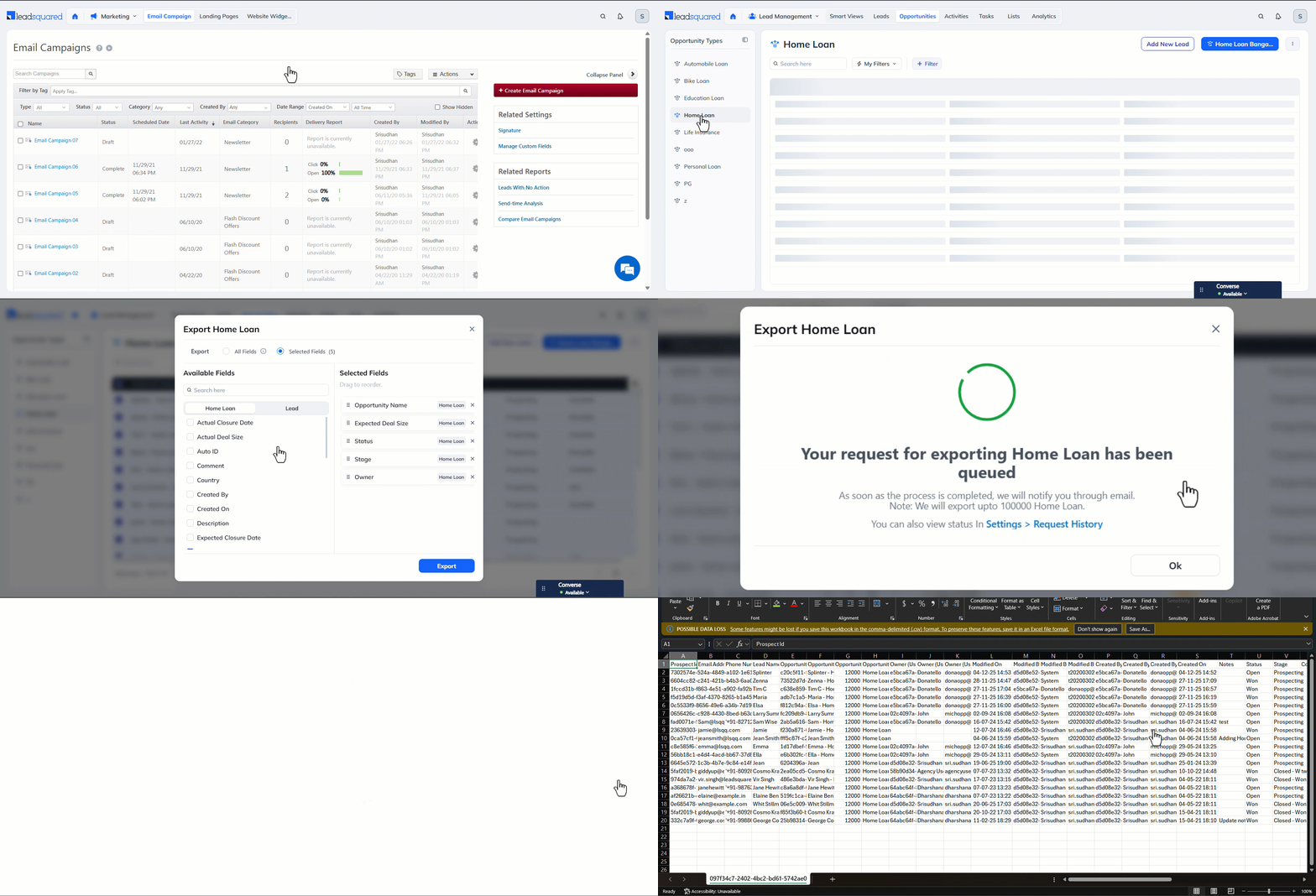
- From the top-bar menu, navigate to Lead Management>Opportunities.
- On the left-menu, navigate to the Opportunity Type you want to export.
- On the Manage Opportunities page, alongside the opportunities you want to export, select the checkbox.
- You can also select all opportunities on the page by clicking the checkbox alongside Opportunity Name.
- Hover your cursor on the three dots menu on the top-right, and click Export opportunity type (e.g., Export Home Loans).
- On the Export Opportunity pop-up, choose whether you want to export All Fields or Selected Fields.
- All Fields will export all the opportunity fields, along with a few lead fields.
- Selected Fields lets you select the opportunity and lead fields you want to export.
- Once you finish, click Export. You’ll soon receive an email with a link to download the .csv file.
- Alternatively, you can navigate to the Request History page, from where you can download a copy of the .csv file.
Note:
- To add or delete fields in your opportunity form, refer to Opportunity Configurations.
- By default, you can export up to 100,000 opportunities per request. To increase the export limit upto 1,000,000 write to support@leadsquared.com. To export even larger data sets, see refer to How to Export More than 1,000,000 Opportunities or Large Exportable Reports.
Any Questions?
Did you find this article helpful? Please let us know any feedback you may have in the comments section below. We’d love to hear from you and help you out!
If I have a 1 crore or 2 crore opportunity in one shot, how should I export it? Should I export it?
I suggest considering the creation of an opportunity list based on a specific set of leads when generating an opportunity. This could greatly enhance our workflow and efficiency.
Hey, Bhaskar. Great question. Give us a day or so, and we’re creating a new help article to address this use case. I’ll share it with you once it’s published. Thanks.